Service Hot Leads Details Panel
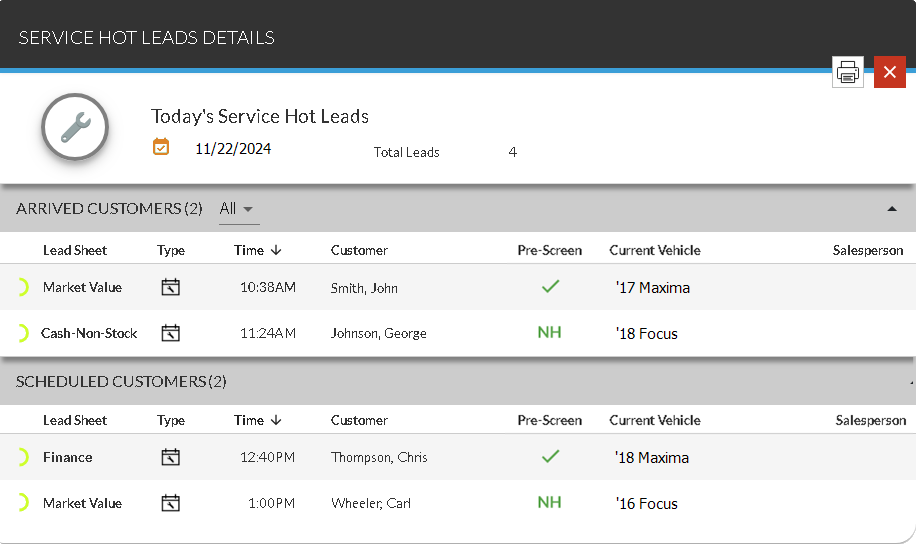
The Service Hot Leads Details panel is used to review additional information for service hot leads sent on a specific day, such as appointment times and customer names. This panel can also be used to access the Lead Sheet panel, where leads can be viewed and printed.

|
To access the Service Hot Leads Details panel, click a row on the Service Hot Leads tab. |
To print the lead sheets for the leads displayed on this panel, click the  (Print) icon. The PRINT button displays in place of the (Print) icon, and check boxes display in each row in the section. Select the check box corresponding to each lead sheet to print, and click the PRINT button. The lead sheets for the selected leads display on a separate browser tab, where they can be reviewed and printed.
 General Information Section
The unlabeled General Information section is used to review the date on which the displayed service hot leads were sent and the number of leads that were sent.
The following items display in the General Information section.
 (Date Added): The date that the service hot leads were sent displays.
Total Leads: The number of service hot leads that were sent displays.
Arrived Customers Section
The Arrived Customers section is used to review lead information for customers who have arrived at the service department. Information is sorted by the time the customer arrived, beginning with the customer who arrived most recently.
To display a certain type of customer in the Arrived Customers section, select a type in the unlabeled Customer Type field.
Click any column heading that displays in bold text to sort the customers. The customers are re-sorted by the entries in the selected column in ascending order, and the  (Ascending) icon displays to the right of the selected column heading.
To change the sort to descending order, click the same column heading again. The customers are re-sorted in descending order, and the  (Descending) icon displays to the right of the selected column heading.
The following columns display in the Arrived Customers section.
Prediction Indicator: (Not labeled) An icon displays to indicate how likely the corresponding customer is to purchase a vehicle.
The following icons can display.
-
 (Okay)
 -
 (Good)
 -
 (Great)
 -
 (Wow)
(Wow)
Lead Sheet: The type of lead sheet suggested for the customer displays. The type of lead sheet suggested for the customer is assigned based on a variety of factors.
Type: An icon displays to indicate the type of service lead.
The following icons can display:
-
 (Appointment)
 -
 (Walk-In)
Time: The time the customer arrived at the service department displays.
Customer: The customer's name displays. In addition, * (Asterisk) displays to the right of the customer's name if the lead sheet has been printed.
Pre-Screen: An icon indicating the credit worthiness of the prospect displays.
The following icons can display:
-
 (Approved). The prospect was pre-approved for financing.
 -
 (No Hit). Credit information could not be found for the corresponding name and address.
 -
 (No Offer). The prospect was denied for financing.
 -
 (Not Applicable). A pre-screen request cannot be sent for various reasons, such as if the prospect is a business. Hover the mouse cursor over this icon to display a tooltip indicating the reason the request cannot be sent.
 -
 (Pending). The pre-screen request is still processing.
Note - Pre-screen results are only available if FOCUS or the Customer application
Current Vehicle: The year and model of the customer's current vehicle display.
Salesperson: The salesperson associated with the customer's current vehicle deal displays.
Worked By: The name of the user who reviewed the lead and performed necessary actions displays. Leads are marked as worked by clicking the  (Unworked) icon on the Lead Sheet panel. When the (Unworked) icon is clicked, the icon toggles to the
  (Worked) icon to indicate the lead was worked.
Note - Marking leads as worked is only available if FOCUS or the Customer application
Scheduled Customers Section
The Scheduled Customers section is used to review lead information for service customers with appointments who have not arrived at the service department. Information is sorted by the scheduled time for the appointment, beginning with the earliest appointment.
Click any column heading that displays in bold text to sort the customers. The customers are re-sorted by the entries in the selected column in ascending order, and the (Ascending) icon displays to the right of the selected column heading.
To change the sort to descending order, click the same column heading again. The customers are re-sorted in descending order, and the (Descending) icon displays to the right of the selected column heading.
The following columns display in the Scheduled Customers section.
Prediction Indicator: (Not labeled) An icon displays to indicate how likely the corresponding customer is to purchase a vehicle.
The following icons can display.
-
(Okay)
-
(Good)
-
(Great)
-
(Wow)
Lead Sheet: The type lead sheet suggested for the customer displays. The type of lead sheet suggested for the customer is assigned based on a variety of factors.
Type: An icon displays to indicate the type of service lead.
The following icons can display:
-
(Appointment)
-
(Walk-In)
Time: The scheduled time for the service appointment displays. If the transportation type of the appointment is Night Drop, the  (Night Drop) icon displays.
Customer: The customer's name displays. In addition, * (Asterisk) displays to the right of the customer's name if the lead sheet has been printed.
Current Vehicle: The model year and model of the customer's current vehicle display.
Salesperson: The salesperson associated with the customer's current vehicle deal displays.
Worked By: The name of the user who reviewed the lead and performed necessary actions displays. Leads are marked as worked by clicking the (Unworked) icon on the Lead Sheet panel. When the (Unworked) icon is clicked, the icon toggles to the (Worked) icon to indicate the lead was worked.
Note - Marking leads as worked is only available if FOCUS or the Customer application
Click here for a list of products that may be mentioned in this help file.